
Technical Components
The Portal Manager is a standard servlet application which is deployed into a servlet container (such as Trifork Application Server). It consists of filters, servlets, and beans plus a few supporting components.
Filters
Filters analyze and modify incoming requests. They are organized in a so-called filter chain. Before a request is answered, it is processed by all or a subset of the filters in a defined order. On its way back to the user, the filters are applied once more, in the reverse order. The filters may add information to the request and the response, modify both or even block them. Depending on the required functionality, filters can be exchanged, removed or added. The most important filters supplied with the Portal Manager are:
- NTLMFilter
- AuthenticationFilter
- PortletFilter
- ContentFilter
- PermissionFilter
Servlets
The task of servlets is to deliver content. In the Portal Manager, a
servlet for delivering static (binary) and dynamic data exists, the
ContentServlet.
As is common with Java web applications, the filters and servlets are
configured by means of the web.xml file.
Beans
Beans are exchangable modules that provide particular functions to filters
and servlets. They are defined and configured by means of the
pm.xml file. Important beans are, for example, the
userManager, portletContainer,
documentManager, and permissionManager beans.
Portal Manager and HTTP Server
In principle, every servlet container also is a web server. Nevertheless, it is currently recommendable to let an HTTP server work as a web server in front of the Trifork server. Because of its popularity and stability we recommend to use Apache HTTP Server. The reasons to use an HTTP server are as follows:
- The option exists to use priviledged ports such as 80 or 443 without having to start the webserver as a superuser. Currently, this is only supported by an HTTP server.
- To be able to continue to use existing log file analyzers, log files in the commons-logging format as produced by Apache HTTP Server are required. At present, Trifork Application Server cannot generate log files in this format. From version 6.5, CMS Fiona provides a corresponding logging filter.
- Apache HTTP Server encrypts HTTPS pages very fast.
Sometimes, other reasons for placing an HTTP server in front of the Trifork server exist:
- Via the HTTP server, additional authentication mechanisms can be used to
set the
RemoteUserwhich can then be evaluated by the Portal Manager. - Other modules such as URL rewriting, response compression, bandwidth restriction and the like can be used in conjunction with the Portal Manager.
Response Process
In the following, assuming the configuration specified above (Apache, Trifork, Portal Manager), the process of responding to a typical request is explained. The file requested is an HTML file containing a portlet.
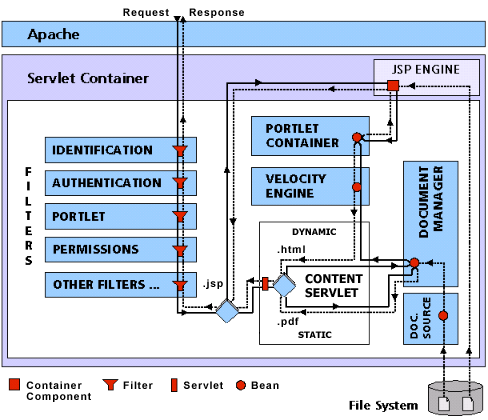
The diagram above illustrates the process for JSPs as well as for binary content.
- Via a browser, a website visitor sends an HTTP request to port 80 of the webserver.
- An Apache webserver accepts the request and redirects it via
mod_jkto the Trifork server. - The Trifork server calls the following filters one after the other for the request:
- Identification via
NTLMFilter, for example. This filter determines the identity of the visitor and sets theRemoteUser. - The
AuthenticationFilterqueries the ADS for theRemoteUserand creates a user object. - The
PortletFilterchecks whether the incoming request is a portlet request. If so, the filter redirects the request to the portlet container. - The
PermissionFilterchecks whether access restrictions exist for the requested file. If so, it checks whether the file may be given to the user and ends the processing of the request if this is not the case.
- Identification via
- With the help of the configuration in the
web.xmlfile, the Trifork determines that theContentServletis responsible for handling the request.- The
ContentServletrequests the file from theDocumentManager. - In live mode (as opposed to preview mode), the
DocumentManagerfetches the file via theFileDocumentSourcefrom the online directory tree, which was created by the Template Engine. - The
ContentServletdetermines the MIME type of the document and delivers the content either as static or dynamic content, depending on the MIME type. - The HTML file will be delivered dynamic by processing the document as a Velocity template.
- The Velocity engine recognizes a command embedding a portlet and
passes the request to the
PortletContainer. - The
PortletContainersends a render request to the specified portlet and returns the HTML code it receives as a response to its request. - The
ContentServletdelivers the assembled page.
- The
- All filters, in reverse order, are now given the opportunity to
modify the outgoing response. The
AuthenticationFilteruses it and adds a cookie for faster authentication at the next request.