
Starting with CMS Fiona 6.7.1, the details overview can have tabs to save space when displaying field sets.
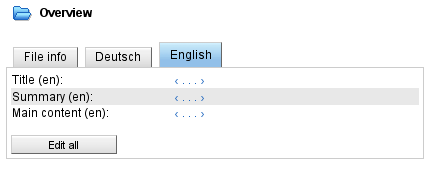
Please include the following bean configuration in the config/contentInspectors.xml file to activate this feature system-wide:
<beans>
    <!-- tabbed overview inspectors. -->
    <bean id="publication-overview" parent="abstract-overview">
        <property name="template" value="tabbed-overview.vm" />
    </bean>
    <bean id="document-overview" parent="abstract-overview">
        <property name="template" value="tabbed-overview.vm" />
    </bean>
    <bean id="image-overview" parent="abstract-overview">
        <property name="template" value="tabbed-overview.vm" />
    </bean>
    <bean id="generic-overview" parent="abstract-overview">
        <property name="template" value="tabbed-overview.vm" />
    </bean>
    <bean id="template-overview" parent="abstract-overview">
        <property name="template" value="tabbed-overview.vm" />
    </bean>
</beans>
In addition to the File info tab, each field set whose name begins with overview_ is displayed on a separate tab. The field sets can be configured individually for each file format.
The following script illustrates how the field sets overview_en and overview_de can be created for the publication file format using Tcl:
attributeGroup create identifier publication.overview_en title English
attributeGroup withIdentifier publication.overview_en addAttributes \
        titleEn summaryEn bodyEn

attributeGroup create identifier publication.overview_de title Deutsch
attributeGroup withIdentifier publication.overview_de addAttributes \
        titleDe summaryDe bodyDe