• Editing Content
  • Logging in to the Content Manager
  • The Main Window of the Content Navigator
  • Hierarchy Display
  • Details View
  • The Preview
  • Editing Elements (Markers)
  • The Menu
  • The Toolbar
  • Dialogs
    • Tasks
    • Finish Editing
    • Edit Links
    • Edit Link Lists
    • Edit Fields
    • Edit Field
    • File Selection
    • Select Workflow Step
    • Assign File Access Permissions
    • Date Selection
    • Color Selection
    • Choose File Format (Extended)
    • Unreachable Link Destinations
    • Choose New Link Destination
    • Versions
    • Define Reminder
    • List Reminders
    • Creating a New File
    • Choose View
    • Content Navigator Settings
    • Colors and Fonts
    • Basic Settings...
    • Local Applications...
    • Change Password...
    • Confirming an Action
    • Editing Content Using a Local Application
    • Sorting Links
    • Importing a File
    • Search
    • Wizards
  • Overview of the Standard Fields
  • Web Folders
  • The Integrated HTML Editor
  • TinyMCE
  • The Markdown Editor
  • The Concepts of Fiona
  • Knowledge Base
  • CMS Fiona
  • Editing Content
  • Dialogs
  • Date Selection

Date Selection

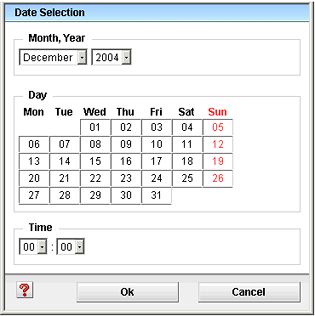
When a field value of the date type is being edited or a date is entered as a search criterion, this date can be manually entered into the input field or by means of a date selection dialog.

In the date selection dialog, choose the month and the year by means of the drop-down lists, click the desired day of the month and adjust the time as desired.
Related links
  • The Menu
  • The Toolbar
JustRelate
  • About us
  • Career
  • Contact us
  • Our partners
Products
  • Email Builder
  • Web Builder
  • CRM
  • Marketing Automation
  • Portal
  • CPQ
  • Analytics
  • Services
Resources
  • Events
  • Downloads
Legal
  • Imprint
  • Transparency Center
  • Privacy Policy
JustRelate Logo