• Editing Content
  • Logging in to the Content Manager
  • The Main Window of the Content Navigator
  • Hierarchy Display
  • Details View
  • The Preview
  • Editing Elements (Markers)
  • The Menu
  • The Toolbar
  • Dialogs
    • Tasks
    • Finish Editing
    • Edit Links
    • Edit Link Lists
    • Edit Fields
    • Edit Field
    • File Selection
    • Select Workflow Step
    • Assign File Access Permissions
    • Date Selection
    • Color Selection
    • Choose File Format (Extended)
    • Unreachable Link Destinations
    • Choose New Link Destination
    • Versions
    • Define Reminder
    • List Reminders
    • Creating a New File
    • Choose View
    • Content Navigator Settings
    • Colors and Fonts
    • Basic Settings...
    • Local Applications...
    • Change Password...
    • Confirming an Action
    • Editing Content Using a Local Application
    • Sorting Links
    • Importing a File
    • Search
    • Wizards
  • Overview of the Standard Fields
  • Web Folders
  • The Integrated HTML Editor
  • TinyMCE
  • The Markdown Editor
  • The Concepts of Fiona
  • Knowledge Base
  • CMS Fiona
  • Editing Content
  • Dialogs
  • File Selection

File Selection

Using this dialog page, files can be selected as link targets, for example.
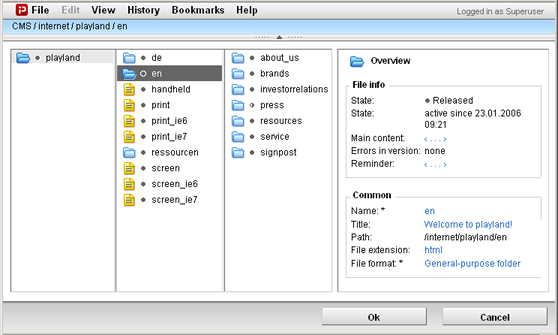
Here, the important file functions of normal Content Navigator windows are available so that you can create or import or search for files, for example.

Select the desired file, then click OK.

Related links
  • Edit Links
JustRelate
  • About us
  • Career
  • Contact us
  • Our partners
Products
  • Email Builder
  • Web Builder
  • CRM
  • Marketing Automation
  • Portal
  • CPQ
  • Analytics
  • Services
Resources
  • Events
  • Downloads
Legal
  • Imprint
  • Transparency Center
  • Privacy Policy
JustRelate Logo